CodexSpec


A Requirements-First SDD toolkit for Claude Code and OpenAI Codex
CodexSpec turns confirmed requirements into traceable specifications, designs, plans, tasks, and implementations. You decide what to build and why; the agent develops how within those confirmed requirements, using review checkpoints and persistent project knowledge.
Use it through Claude Code slash commands, Codex skills, or both. Ordinary features use separate Git worktrees by default, and an optional shared blueprint lets the agent develop a queue of confirmed requirements autonomously.
Why Choose CodexSpec?
| Need | What CodexSpec provides |
|---|---|
| Clear product intent | Explicit confirmation and a persistent requirements.md before specification |
| Traceable development | Source links through requirements → spec → design → plan → tasks |
| Reviewable decisions | Four artifact review commands, cross-artifact analysis, and a separate code defect gate |
| Session and team continuity | Feature records, project principles, reusable knowledge, and relevant historical decisions |
| Multiple features in progress | One Git worktree per ordinary feature, with stable workspace reuse |
| More automation | Optional stage advancement and autonomous development of confirmed blueprint requirements |
| Team language preferences | Independent interaction, document, and commit languages |
What is Requirements-First SDD?
Requirements-First Spec-Driven Development makes confirmed requirements the highest-priority feature authority. The agent records goals, constraints, decisions, exclusions, open questions, and confirmation evidence before deriving the implementation artifacts.
Idea → Confirmed Requirements →     Spec    →     Design    →     Plan    →    Tasks     →     Code
                 ↓                   ↓              ↓              ↓             ↓              ↓
         User confirmation      review-spec   review-design   review-plan   review-tasks   review-code
You confirm the requirements; each derived artifact has its own review, from specification through code.
Human collaboration establishes and changes product intent. Automatic reviews check derived artifacts against it. Enabling automation advances work through passing stages; it does not let the agent silently replace confirmed requirements.
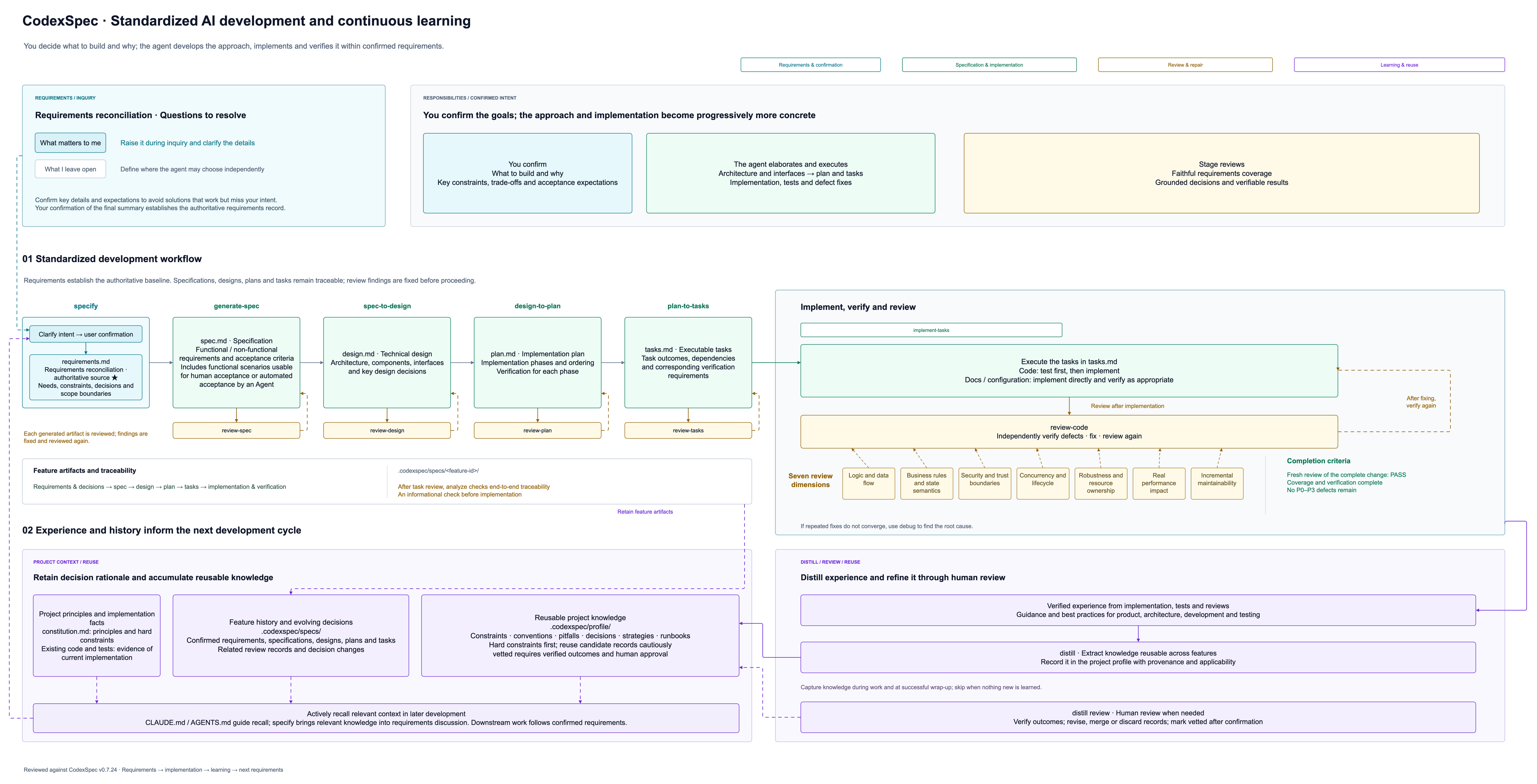
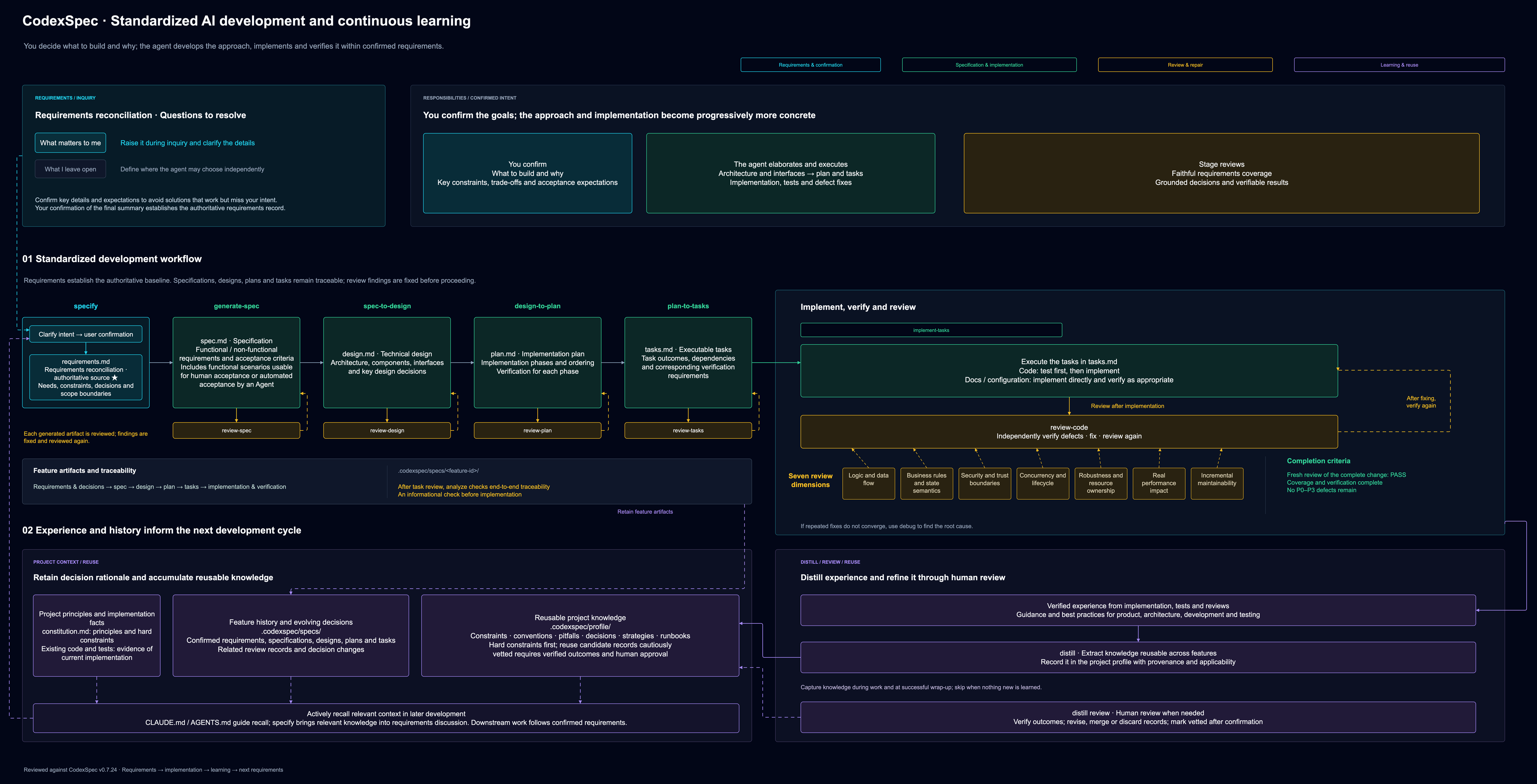
Open the diagram at full size: ☀️ · 🌙


30-Second Quick Start
Install CodexSpec and initialize for the assistant you use:
uv tool install codexspec

# Create a new project for Claude Code
codexspec init my-project --ai claude

# Or initialize an existing project for Codex
cd your-existing-project
codexspec init . --ai codex

# Use --ai both when you want both integrations
Start your installed assistant in the initialized project. The same workflow uses these two invocation forms:
| Assistant | Start requirements discovery |
|---|---|
Claude Code (claude) |
/codexspec:specify I want to build a todo application |
Codex (codex) |
$codexspec:specify I want to build a todo application |
Customize project principles with constitution when needed. Confirm the final
requirements summary, then continue using the returned feature directory and
workspace. See Core Workflow for the remaining commands.
Using the Codex desktop app? Ask Codex to install and initialize your project.